
7 Best Background Music Remover Tools 2025: Comparison Guide
PAGE
By PAGE Editor
Finding the right background music remover can make or break your audio project. Whether you're creating karaoke tracks, cleaning up podcasts, or producing cover songs, the quality of your music remover tool directly impacts your final results.
We've tested seven popular background music removal tools to help you choose the best solution for your needs. Here's what we discovered.
What Makes Great Background Music Remover?
The best music remover should deliver high-quality audio separation, intuitive interfaces, fast processing, and reasonable pricing. Let's see how these seven options stack up.
1. AudioCleaner - The Music Remover Winner
AudioCleaner sets the gold standard for Background Music Remover technology. Using advanced AI algorithms, it achieves up to 95% accuracy in separating vocals from instrumental tracks – far exceeding traditional methods.
Why AudioCleaner Dominates
Lightning-Fast Processing: Cloud-based processing completes most songs in under 3 minutes without quality loss.
AI-Powered Precision: Deep learning technology intelligently identifies and preserves vocal characteristics while cleanly removing background music.
User-Friendly Design: Simple upload-and-process workflow requires zero technical knowledge. Available on web and mobile platforms.
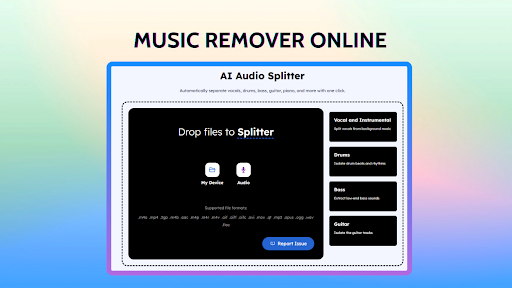
Remove Bg Music but Keep Voice: It is where AudioCleaner - Music Remover stands out. And you can directly upload a video and extract a video without background music.
Perfect For: Content creators, podcasters, musicians, and anyone needing professional results without complexity.
2. Audacity
Audacity, the veteran open-source audio editor, includes a basic vocal removal feature that has been around for years. While the price point (free) is attractive, the functionality leaves much to be desired for modern users.
The tool operates on a simple principle: removing the center channel where vocals are typically mixed. This approach works only with specific recording techniques and fails dramatically with modern production methods. Users must manually adjust parameters, often through trial and error, with inconsistent results.
3. LALAL.AI
LALAL.AI positions itself as an AI-powered audio separation service, offering neural network technology for music remover applications. While the underlying technology shows promise, several factors limit its appeal to mainstream users.
The platform provides clean separation in many cases, particularly with well-recorded source material. However, the pricing structure makes it prohibitively expensive for regular use. Free users cannot download the processed files – barely enough to evaluate quality, let alone complete any meaningful work.
4. Spleeter by Deezer
Deezer's Spleeter represents an impressive engineering achievement in open-source audio separation. Built on TensorFlow, it can separate audio into multiple stems with reasonable quality. However, practical implementation remains a significant barrier for most users.
The tool requires substantial technical knowledge, including familiarity with command-line interfaces, Python programming, and machine learning frameworks. Installation involves multiple dependencies and configuration steps that can frustrate even technically inclined users.
5. Phonicmind
Phonicmind markets itself as a simple online music remover solution, promising easy vocal extraction through web-based processing. Unfortunately, the execution falls short of these promises in several critical areas.
The platform suffers from frequent technical issues, including server downtime and processing failures that can waste users' time and uploaded content. Audio quality varies dramatically depending on source material, with no clear indication of expected results before processing.
6. Vocal Remover Pro
This mobile-focused application attempts to bring background music remover functionality to smartphones and tablets. While the concept has merit, the execution reveals significant shortcomings that limit its practical utility.
The app's interface feels dated compared to modern mobile applications, with confusing navigation and poorly organized features. Processing quality remains inconsistent, often producing artifacts and distortions that make the output unsuitable for professional use.
7. Adobe Audition
Adobe Audition includes sophisticated spectral editing tools that can achieve excellent vocal isolation results. However, accessing this capability requires significant investment in both software subscriptions and learning time.
The software's spectral frequency display allows precise manual editing of audio content, enabling skilled users to achieve results that automated tools might miss. However, this precision comes at the cost of accessibility and efficiency.
Which Music Remover Should You Choose?
For Most Users: AudioCleaner - Music Remover provides the perfect combination of quality, simplicity, and value. Its AI technology delivers professional results in minutes, not hours.
For Budget Users: Even budget-conscious users benefit from AudioCleaner's free tier, which offers more value than most paid alternatives.
For Professionals: AudioCleaner - Music Remover handles 95% of professional needs. Only specialized audio engineers might need additional tools like Audition for specific edge cases.
Conclusion
AudioCleaner clearly leads the background music remover market with superior AI technology, user-friendly design, and excellent value. While other tools exist, they either compromise on quality, usability, or pricing.
For reliable vocal isolation without technical headaches, AudioCleaner is the obvious choice. Its advanced algorithms consistently deliver professional results that would cost hundreds in studio time, all through a simple web interface.
HOW DO YOU FEEL ABOUT FASHION?
COMMENT OR TAKE OUR PAGE READER SURVEY
Featured





adidas’ SoHo flagship and SS26 Creative Class reposition retail as a living cultural platform, investing in New York’s creative communities to drive sustained relevance beyond product.