
Free AI Avatar Video Generators Online: What You Actually Get at $0

PAGE
By PAGE Editor
Recording a talking-head video once meant renting a studio, memorizing lines, and hoping the lighting held up. Now you can open a browser, paste a script, and watch a digital presenter deliver it in under a minute—no budget required.
The hitch? Most “free” plans hide watermarks, blurry exports, or stingy credit limits. After combing forums, docs, and user reviews, we uncovered ten platforms that still hand you publish-ready footage at zero cost. We grouped them by use case so you can spot the right fit fast—no wasted credits.
Scroll on to see which avatar generator deserves a place in your toolkit.
How we picked the stand-outs

We started with a simple question: which free avatar generators give you a video you can publish, not just a watermarked teaser?
Over three weeks we signed up for twenty-two platforms, burned through trial credits, and read every “limitations” footnote we could find. We watched Reddit threads praise and roast each tool, then cross-checked those opinions against G2 reviews and official docs. Only services that still offered a functioning free tier in March 2026 made the short list.

Next we measured each candidate against seven concrete factors:
Minutes or credits you receive at no cost.
Whether the exported file carries a visible watermark.
Avatar realism: lip-sync accuracy, facial nuance, and voice quality.
Language and voice range, because global audiences matter.
Ability to upload or clone a custom avatar on the free plan.
Output resolution and download rights.
Bonus value, like interactive quizzes, live streaming, or automatic script drafting.
Scores told only part of the story; use case filled in the gaps. A marketer chasing TikTok-style UGC cares about authenticity, not corporate polish. An HR trainer needs consistent branding and closed captions, not jump-cuts. We grouped the winners by purpose first, then lightly ranked them inside each group based on free-tier generosity and quality. That way you can jump straight to the cluster that matches your goal and pick the top fit in minutes.
The result is a list of ten tools that won’t waste your time or your credit card number.
Professional training and internal comms
Synthesia – studio-grade polish on a tight leash
If you have watched those slick onboarding videos where an avatar in a blazer welcomes new hires, you have likely met Synthesia. The platform set the bar for realism, and its new Basic plan lets everyone test that quality for free. You receive up to three minutes of generation each month and nine stock avatars before the meter stops.
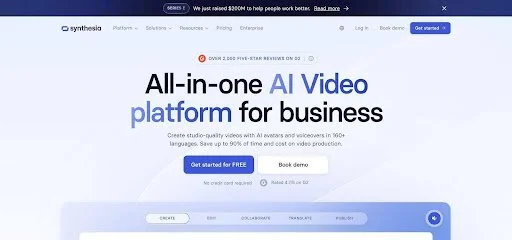
Synthesia AI avatar training video interface example
The first thing you notice is how clean the lip-sync looks. Words land on the right syllable, eyes track the camera, and the HD background stays sharp even in motion. That professionalism suits compliance modules or leadership messages where brand trust matters.
There is a catch. Free exports carry a Synthesia logo in the upper corner, resolutions top out at 720p, and you cannot upload a custom avatar of yourself. The library also shrinks to a handful of presenters, all dressed for the boardroom. Think polished but a bit stiff; great for policy walk-throughs, less so for a hype video on TikTok.
Still, those three free minutes let you draft a proof of concept, localize a script into Spanish, or convince a budget holder that AI video is ready for prime time. Treat Synthesia as your corporate benchmark: if a rival tool looks off next to it, you know which subscription deserves the upgrade.
Colossyan – short lessons that quiz your viewer back
Colossyan Creator sits at the crossroads of video and e-learning. Its forever-free tier grants you five minutes of generation each month split across two clips, and those minutes give you a feature no rival matches at zero dollars: in-video quizzes.
Picture a three-scene onboarding module. The avatar covers a safety rule, the video pauses, and a multiple-choice question pops up. Your new hire answers, then the lesson continues. All of that interaction happens inside Colossyan’s player without touching an authoring tool. For training teams scrambling to keep learners awake, that perk alone justifies adding Colossyan to the stack.
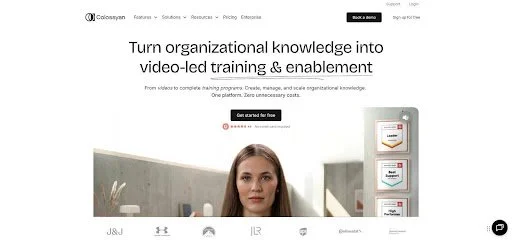
Colossyan AI video with in-video training quiz
Avatar quality sits a notch below Synthesia. Mouth shapes occasionally drift off-sync, and you only get a dozen presenters on the free plan. On the upside, those faces show a wider emotional range, from smiles to raised eyebrows, so your script feels less robotic. Exports arrive in 720p with a small logo, perfectly fine for an internal LMS.
Use Colossyan when you need quick micro-learning that checks understanding, not just attention. Record a screen demo, drop a Colossyan avatar in the corner, sprinkle two quiz cards, and you have an engaging five-minute lesson without opening Premiere.
Elai – one-minute prototypes and clever workflow tricks
Elai lives on a different branch of the training tree. The free tier hands you a single video, capped at one minute, yet it opens doors to features you usually find behind a paywall, like URL-to-video conversion and bulk personalization hooks. Think of it as a sandbox for process nerds who want to test automation before writing a check.
Paste a blog-post link and Elai drafts a storyboard, picks stock visuals, and drops an avatar to narrate. The draft needs polishing, but it shows how fast long-form text can morph into micro-learning. Developers get excited here because the same engine talks to an API; you can feed a spreadsheet of names and crank out individualized welcome clips in one batch once you move beyond free.
Avatar realism falls between Colossyan and Synthesia. Faces feel slightly rigid, and you hear the occasional robotic lilt, especially in non-English voices. Still, the library covers more than seventy languages and mixes human presenters with cartoon mascots, giving you stylistic wiggle room for tech walkthroughs or product how-tos.
Use your free minute wisely. Script a tight intro, export, and share it with stakeholders. If the automation pitch lands, you are ready to scale with paid minutes. If it flops, you lost nothing but lunch-break experimentation.
Marketing and sales content
CRITICAL RULES:
Make ONLY the specified edit - do not modify any other text
Preserve ALL formatting and line breaks exactly:
Keep line breaks in the section content
Keep line breaks WITHIN the replacement text
If replacement text contains blank lines (line breaks), preserve them exactly
Do NOT normalize multi-line text into a single paragraph
PRESERVE MARKDOWN LINK SYNTAX: Keep text format for links - do NOT convert to HTML <a> tags
DO NOT use HTML entities: Keep & as &, not &, keep " as ", not ", etc.
DO NOT use em-dashes (—) or en-dashes (–): Use regular hyphens (-) only
Return ONLY the edited section content with no explanations, no preamble, no markdown code fences
If you cannot find the exact sentence, find the closest match and replace it
Do not add any commentary or notes
The output should be pure article text that can be directly inserted
CRITICAL: If the replacement text contains line breaks (blank lines between sentences), you MUST preserve those line breaks in your output. Do NOT combine lines into dense paragraphs.
Leonardo Interactive stands out for its focus on animated visuals instead of talking heads.
HeyGen: three free minutes, no watermark, real marketing muscle
HeyGen is one of the few platforms that lets you create and download a branded video without splashing its own logo across the screen. New users receive three one-minute videos each month, and the files ship watermark-free.

HeyGen marketing video editor with watermark-free export
That small detail changes everything. A social ad, a LinkedIn pitch, or a landing-page explainer can move straight to production instead of sitting in demo purgatory. Pair that freedom with a library of more than a hundred avatars, from suited professionals to upbeat Gen Z presenters, and you can match almost any brand voice in minutes.
The interface feels closer to Canva than Premiere. Drop an avatar into a template, tweak font and background colors, paste your script, then preview. Need quick localization? Switch the voice to Portuguese, keep the same avatar, and regenerate. HeyGen supports more than 300 voice and language combinations, handy when you want one campaign to speak fourteen dialects.
Quality holds up. Lip-sync stays believable, and the 720p limit looks crisp on mobile feeds. Weak spots show up in edge cases: complex medical jargon trips pronunciation, and budget voices can sound wooden. Still, for everyday ads and product walk-throughs, the output appears polished enough that viewers assume you hired talent, not AI.
If you run paid social or send prospecting videos, HeyGen’s free tier is a low-risk way to confirm that avatar content converts. Record your screen, add a friendly presenter, and finish with a clear call to action—all before your coffee cools.
Vidyard: quick pitches that slot into your sales stack
Vidyard earned its stripes as a screen-recording and hosting platform for sales teams. In 2025 it rolled out stock AI avatars, and those avatars now sit inside the same free plan reps already use for prospecting videos.
There is no credit counter to watch. Record, trim, and share as many clips as you want; the only constraint is length. Avatar segments top out near one minute, the sweet spot for cold-outreach emails. Better yet, the export carries no intrusive watermark, only a small Vidyard bumper at the end that most viewers miss.
Workflow is the win here. You type a script, choose a friendly presenter head, and Vidyard delivers a bubble video you can drag onto any existing screen capture. The result feels like a picture-in-picture conversation: slide deck on the left, avatar on the right, personal greeting baked in. Because the file lives on Vidyard’s CDN, you also get open notifications and view heat-maps, data most standalone generators cannot match.
Avatar realism is serviceable, not cinematic. Mouths sync well enough, but body motion is limited, and the voice catalog leans English-first. For a SaaS demo or a renewal reminder, that level of quality is fine; you are chasing engagement, not a film award.
If your sales process already leans on Vidyard links, turning on avatars is a free morale boost. You skip hair and makeup, stay off camera on bad-lighting days, and still give prospects a human face to connect with.
Creatify: free credits for scroll-stopping UGC ads
Scroll TikTok and you see a smiling customer rave about a product for fifteen seconds. That vibe—authentic, handheld, captured in a bedroom—matches what Creatify automates. Sign up and you get ten credits each month, enough for one or two short spots that look like real user-generated content.
The workflow is simple. Drop a product URL, choose “testimonial” or “unboxing,” and Creatify drafts the script, picks an everyday-looking avatar, and produces a vertical video complete with captions. You can tweak lines or swap the presenter, but many marketers hit render and test the ad as is.
Because the style is intentionally lo-fi, viewers rarely question authenticity. A slight dip in lip-sync fidelity goes unnoticed, while the casual tone lifts click-through rates. The trade-off is control: you will not get studio lighting, HD resolution, or cinematic camera moves. You also work around a small watermark in the corner, fine for social feeds but not for a homepage hero.
Credits reset monthly and do not roll over, so make it a habit to generate fresh creative each launch cycle. Mix two hooks, A/B test thumbnails, and watch which version drives the best cost per click before investing in polished production.
For lean e-commerce teams chasing rapid ad iterations, Creatify’s free tier feels like having a freelance creator on standby who never sleeps and never asks for revisions.
Leonardo Interactive: turn art or photos into motion
Leonardo Interactive stands out for its focus on animated visuals instead of talking heads. The free beta gives you a bucket of credits each month, enough for dozens of five-second animations with no watermark, according to user reports.
Open the AI Video (Motion) tab, type “cyberpunk city at dusk” or upload a hand-drawn logo, then tweak frame count and motion strength. Seconds later the image breathes: neon signs flicker, clouds drift, or your mascot blinks and waves. Because Leonardo began as an image generator, you inherit deep style controls such as lighting presets, camera moves, and a seed lock for exact recreations.
The output works best as B-roll. You will not feed a three-minute script here. Instead, drop the loop behind title cards, add energy to Instagram reels, or spice up a training intro. Designers appreciate the speed because they can iterate looks faster than After Effects mock-ups.
Limits matter. Clips rarely exceed six seconds, resolution hovers at 720p, and the credit meter drains quickly if you pursue 24-frame sequences. Even so, nothing else in the free market gives you bespoke motion this fast and logo-free.
If your project calls for eye-catching visuals rather than a human face, spend an afternoon in Leonardo. You will leave with animated assets that lift any video you build elsewhere without needing a green screen or a motion-graphics degree.
D-ID Creative Reality: animate any photo and chat with it
D-ID became popular by making still portraits speak, and that appeal remains. The free trial lasts fourteen days and covers about three minutes of generation, enough to test both video creation and the platform’s headline feature: live, conversational avatars.
Upload a selfie or a vintage family photo. D-ID maps facial landmarks, adds subtle head movement, and lets you pick from more than two hundred voices. The result feels uncanny in the best way as Grandpa suddenly thanks you for digitizing his memories. Educators turn historical figures into guest lecturers, while marketers produce niche influencers without a film crew.
The studio also includes “Chat D-ID.” Type a question, and the avatar responds on video in real time with synced lips. For a product FAQ widget or a virtual museum guide, that interactivity is priceless. No other free plan replicates it.
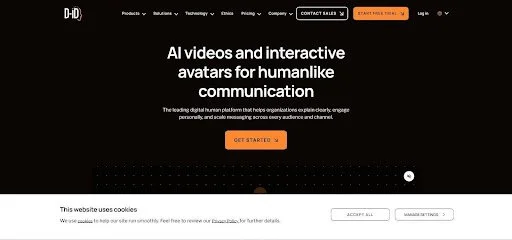
Trade-offs exist. Exports carry a small watermark and max out at 720p. Lip-sync can wobble if your source image sits at an unusual angle, and after the trial you need a paid plan that starts around five dollars a month.
Use D-ID when you want to surprise viewers with a face they did not expect to see move, or when you need a talkative AI helper instead of a one-way presenter. It excels at moments of delight that standard avatar tools cannot deliver.
At-a-glance: what each free plan really gives you
After eight product deep dives, the numbers can blur together. The table below sorts the essentials—minutes, watermark status, and standout perk—so you can choose a tool in half a minute.
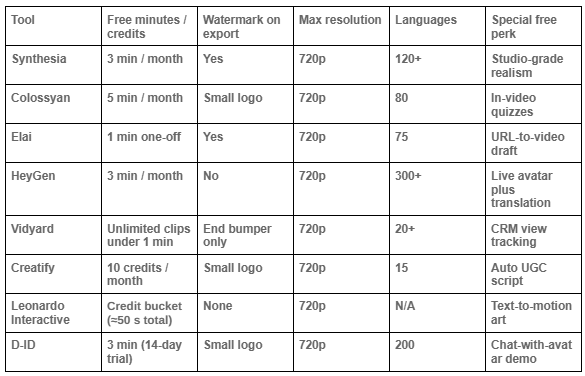
Treat these figures as reference points. Providers adjust quotas often, so confirm details on the pricing page before a major campaign. For most training, prospecting, and social ad projects, these limits stay stable enough to plan a pilot without surprises.
Frequently asked questions
(No questions have been added yet.)
How to choose the right free AI avatar generator
Start with your goal. If you need a polished presenter for mandatory training, quality outranks every other variable. That steers you toward Synthesia or Colossyan. Their avatars look credible, speak dozens of languages, and three to five free minutes are enough to prove value and draft a template you can reuse on a paid tier later.
Chasing social clicks? Watermark-free output beats limitless minutes. HeyGen’s three no-logo videos provide more real-world value than ten watermarked clips you never publish. Pair those clean exports with its template library and you have a full-funnel test without opening Photoshop.
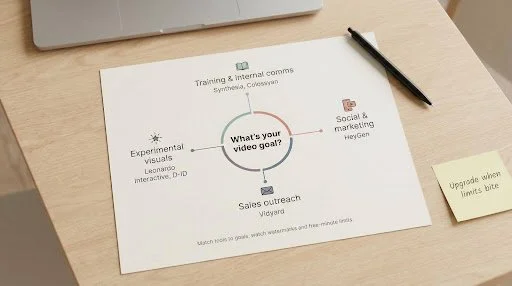
For sales outreach, speed and analytics rule. Vidyard wins because the tool lives where your reps already work and tracks every view. A one-minute cap is irrelevant when most prospects bail after thirty seconds anyway.
Need experimental visuals instead of a talking head? Leonardo Interactive lets you animate art, while D-ID lets you chat with a photo. Both serve niche but memorable roles: intros, B-roll, or virtual assistants.
Finally, calculate true cost. Free quotas refresh monthly, so spreading production across two or three platforms can cover a surprising workload. The moment you slice a five-minute script into one-minute chunks, upgrade. Even a forty-dollar month of credits is cheaper than a single day on set.
In short, match the tool to the use case, watch for hidden watermarks, and plan for scale as soon as free limits slow you down.
What’s next for free AI avatars
The last two years show how quickly top-tier quality reaches the free tier. Google’s Veo model already creates minute-long, lip-synced video inside Vertex AI, and analysts expect a consumer version later this year. When that rollout lands, 1080p resolution and smoother head movement will likely become standard, even on no-cost plans.
Big-suite incumbents are circling. Google Workspace added AI presenter snippets to Google Vids, and Microsoft is testing avatars in PowerPoint and Teams. Their entry will push startups to raise free quotas or bundle fresh perks such as real-time meeting avatars or tighter CRM links to stay competitive.
Interactivity is next. D-ID’s chat demo hints at the future of training and support video: viewers talk, avatars answer. Expect more “choose your own response” clips where a prospect can ask price or tech questions and receive a tailored answer without a human rep.
Regulation is coming. The entertainment strikes of 2025 put digital likeness rights under a spotlight, and EU lawmakers are drafting rules that may require identity checks for custom avatars. Free tiers could soon place self-upload features behind verification, so plan for extra steps when cloning yourself.
Quantity alone will not cut it. Social feeds already overflow with AI filler, and algorithms are shifting to highlight content that feels human. The winners will pair these free tools with sharp scripts, thoughtful storytelling, and careful editing. The tech may be free, but craft still sets you apart.
Final thoughts
Free avatar generators have moved from gimmick to practical tool. You can record a compliance module, ship a LinkedIn pitch, or animate a logo without spending a cent if you pick the right platform.
Keep the trade-offs in mind. Watermark-free output often costs minutes, ultra-realism comes with logos, and quirky creative tools give you motion but no narration. Use the comparison table as your compass, mix platforms to stretch your quota, and upgrade only when the math shows your time is worth more than the subscription fee.
Above all, start with a sharp script. Even the best AI presenter cannot rescue a dull message. Pair clear words with these free minutes, and you will look like you spent a fortune on video while your budget stays at zero.
HOW DO YOU FEEL ABOUT FASHION?
COMMENT OR TAKE OUR PAGE READER SURVEY
Featured





Water offers enjoyment, relaxation, and physical activities for people.