
How to Watch Netflix Without Ads?
PAGE
By PAGE Editor
Netflix is known for offering high-quality movies, shows, and original content — but in recent years, many users have been surprised to find ads showing up in their streaming experience. Since Netflix introduced its ad-supported plan, a growing number of subscribers have started asking the same questions:
“Does Netflix have ads?”, “How many ads does Netflix have?”, and most importantly, “How can I watch Netflix without ads?”
If you’re tired of interruptions and want to enjoy your favorite shows ad-free, this guide will walk you through several practical solutions. We’ll cover official methods, software tools like CleverGet Netflix Downloader, and even techniques to block Netflix ads efficiently.
Let’s explore your options to watch Netflix without ads in 2025 and beyond.
Option 1: Watch Netflix Without Ads by Upgrading Your Plan
The most straightforward and official way to eliminate ads on Netflix is to upgrade your subscription plan.
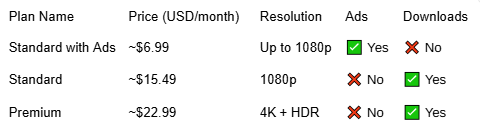
Netflix currently offers several tiers, but only the “Standard with Ads” plan includes commercials. All higher plans are completely ad-free.
Current Netflix Plans (as of 2025):
Steps to Upgrade:
Open Netflix and go to your Account Settings.
Under “Plan Details,” click Change Plan.
Choose Standard or Premium (both ad-free).
Confirm and save your changes.
Once your plan is upgraded, your account will be immediately ad-free, and you’ll also gain access to downloads for offline viewing.
Bonus Tip:
Higher-tier plans also remove Netflix offline playback limits — meaning you can download more videos at once, watch them across multiple devices, and store them for up to 30 days (depending on title availability).
If you don’t mind paying a bit more, this is the easiest and safest method to get rid of ads on Netflix.
Option 2: Watch Netflix Without Ads Using a Video Downloader
If you’re looking for an alternative way to enjoy ad-free Netflix content without upgrading, you can use a video downloader to save your favorite shows and movies for offline viewing.
One of the most reliable tools for this is CleverGet Netflix Downloader. It is a powerful desktop application that allows users to download Netflix videos directly to their computer in HD quality. Once downloaded, you can watch your videos anytime, anywhere — completely ad-free.
Key Features:
Removes and skips ads on Netflix automatically.
Supports downloads in 1080p resolution.
Saves subtitles and audio tracks in multiple languages.
Supports batch downloads and background processing.
Provides built-in playback options for offline enjoyment.
Steps to Download Netflix Videos Without Ads:
Install CleverGet Netflix Downloader on your Windows or Mac device.
Launch the software and log in to your Netflix account within the built-in browser.
Find the show or movie you want to download.
CleverGet will automatically detect available video options.
Choose resolution, format (MP4/MKV), and subtitles.
Click “Download.”
Once the download completes, you can watch Netflix offline without ads anytime — even without an internet connection.
Why This Works:
Because the downloader extracts the original stream before playback, it eliminates all ad insertions. You get a clean, ad-free copy saved locally on your device.
Option 3: Watch Netflix Without Ads Using an Ad-Blocker
Another method to minimize or remove ads on Netflix (especially on browsers) is to use a reliable ad-blocker extension. While this method doesn’t always guarantee full ad removal, it can help reduce interruptions.
How to Block Netflix Ads Using an Ad-Blocker:
Install a trusted browser ad-blocker like uBlock Origin or AdGuard.
Enable it in your Chrome, Edge, or Firefox browser.
Open Netflix and log in.
Adjust ad-blocker filters to target video ads or tracking scripts.
Can Ad-Blockers Remove Netflix Ads Completely?
For the ad-supported plan, ad-blockers can sometimes mute or hide ad sections, but they can’t fully bypass the streaming ad segments because Netflix integrates them into its video timeline.
However, if you’re using the Standard or Premium plans, ad-blockers help prevent pop-ups, banner ads, and tracker scripts — ensuring smoother performance.
Why Use This Method:
Simple and free to implement.
Reduces distractions and page load issues.
Works well for web-based Netflix viewing.
If you’re determined to block Netflix ads completely, pairing an ad-blocker with a downloader like CleverGet Netflix Downloader gives you the best experience possible.
Comparison & Final Recommendations
Here’s a quick comparison of all methods to help you choose the best one:
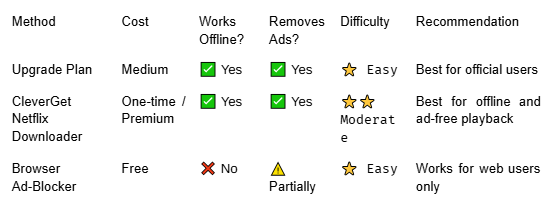
If you prefer an official approach, upgrading your Netflix plan is the most seamless and policy-compliant solution.
But if you want full control over your downloads and ad-free playback anytime, the CleverGet Netflix Downloader provides the best flexibility and performance. It eliminates ads entirely and removes Netflix offline playback limits, giving you unlimited access to your favorite titles — even when traveling or offline.
FAQs
1. Does Netflix have ads?
Yes. Netflix offers an ad-supported plan called “Standard with Ads.” All other plans remain ad-free.
2. How many ads does Netflix have per hour?
Typically, Netflix shows 4–5 minutes of ads per hour of content on the ad-supported plan. Ads may appear before and during your show or movie.
3. How to block Netflix ads on my browser?
You can install a browser extension like AdGuard or uBlock Origin. These tools help block most ad trackers and overlays but may not remove integrated video ads entirely.
4. How to get rid of ads on Netflix permanently?
Upgrade to an ad-free plan or use CleverGet Netflix Downloader to download ad-free copies of your favorite shows for offline viewing.
5. Can I download Netflix videos with ads?
Only the ad-free plans officially support downloads. However, with CleverGet Netflix Downloader, you can download any Netflix video, even from an ad-supported account, and watch it offline without interruptions.
Conclusion
Netflix remains one of the best streaming services in the world — but ads can easily disrupt your binge-watching experience. Fortunately, there are multiple ways to watch Netflix without ads, depending on your preferences and budget.
Upgrade your plan for the official ad-free experience.
Use CleverGet Netflix Downloader for ad-free offline viewing.
Apply browser ad-blockers to reduce ad clutter online.
For ultimate freedom and uninterrupted streaming, CleverGet Netflix Downloader is the standout solution. It not only removes ads but also lets you bypass Netflix offline playback limits, ensuring you can enjoy unlimited, high-quality videos anytime — no ads, no buffering, no restrictions.
With the right approach, you can bring back the classic Netflix experience — pure entertainment without interruptions.
HOW DO YOU FEEL ABOUT FASHION?
COMMENT OR TAKE OUR PAGE READER SURVEY
Featured





Meta’s prescription-ready Ray-Ban AI glasses mark a pivotal shift from experimental wearable tech to everyday infrastructure, embedding intelligence seamlessly into how—and what—we see.