
When a Photo Starts to Feel Alive: A Practical Look at Image-to-Video
PAGE
By PAGE Editor
You’ve probably had this experience before. You upload an image you genuinely like — a product shot, a portrait, a carefully edited visual — and it looks good. Yet after a few seconds, attention drifts away. The image doesn’t guide the eye, it doesn’t create rhythm, and it doesn’t suggest what to look at next. That quiet limitation is what led me to explore Image to Video. Not because I expected instant cinematic results, but because I wanted to see whether subtle motion could extend the emotional life of a still image without turning the process into full-scale video production.
What follows is not a promise of effortless magic. It’s a grounded account of how image-to-video behaves in real use, based on hands-on testing, small adjustments, and realistic expectations.
Why Still Images Often Fall Short Online
A strong photo can communicate clarity and taste, but it operates in a single moment. Online, however, attention unfolds over time. Viewers subconsciously expect cues: a sense of pacing, depth, or movement that signals where to focus next.
This mismatch becomes visible on landing pages, product showcases, and social feeds. Even well-designed visuals can feel static once the initial impression fades. Motion, when handled carefully, doesn’t replace the image. It complements it.
How Image-to-Video Behaves in Practice
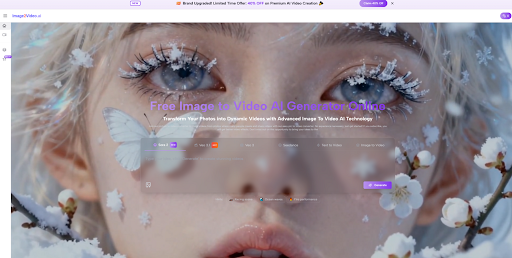
At a basic level, image-to-video tools treat your photo as the opening frame of a short scene. The system attempts to infer how that scene might continue moving based on your description.
In my testing, the quality of that continuation depended far more on guidance than on luck.
Images That Translate Better Into Motion
Certain characteristics consistently produced more stable results:
A clear, dominant subject
Clean edges and sufficient resolution
Balanced lighting without extreme contrast
Backgrounds that don’t compete for attention
When the image already feels visually calm, motion tends to reinforce it rather than distort it.
Why Prompting Feels Like Direction, Not Decoration
The biggest shift in results came when prompts were written less like captions and more like simple production notes. Instead of describing what the image “is,” I focused on how it should behave over time.
Describing camera movement, motion intensity, and mood often led to calmer, more believable output. Vague requests tended to invite exaggerated or unstable motion.
A Before-and-After Perspective on Motion
Before motion is added, an image delivers everything at once. The viewer processes it, then decides whether to stay.
After motion is introduced — even subtly — time becomes part of the experience. A slow camera push, a gentle shift in light, or slight environmental movement can create a sense of intention. In my experience, the most convincing results didn’t look animated. They looked like the moment had space to unfold.
Where Image-to-Video Feels Most Natural
Product and brand presentation
For products, especially physical ones, slight motion can communicate form and material more effectively than a static frame. A gentle orbit or lighting shift adds dimension without overwhelming the image.
Creator and social content
When working with existing visuals, image-to-video makes it easier to explore different moods quickly. One image can become several short clips, each emphasizing a different emotional tone.
Personal and archival imagery
With restraint, motion can add emotional depth to personal photos. Subtlety matters here. In my tests, smaller movements often felt more respectful and believable than dramatic effects.
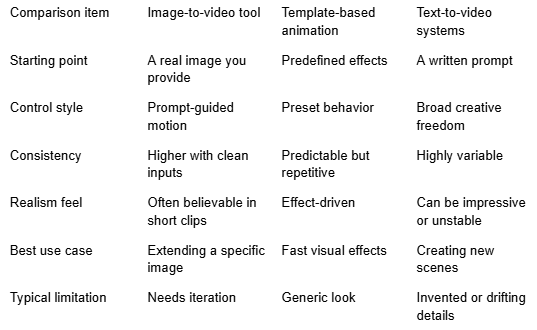
A Practical Comparison of Common Approaches
Observations on Realism and Technical Limits
Based on my own use, image-to-video performs best when expectations stay grounded. Motion can feel surprisingly natural when it’s subtle and the source image is strong. More complex physical interactions or dramatic camera moves tend to introduce instability.
Clip length also matters. Short segments feel more controlled, while longer sequences usually benefit from being assembled from multiple generations and refined in post-editing.
Why Iteration Is Part of the Experience
In practice, generating multiple versions isn’t a flaw. It’s part of the workflow. Small changes in prompts often lead to noticeable differences in motion quality. When something feels off, reducing movement or clarifying camera behavior usually improves the next result.
Seeing the process as drafting rather than one-click output made the tool feel far more predictable.
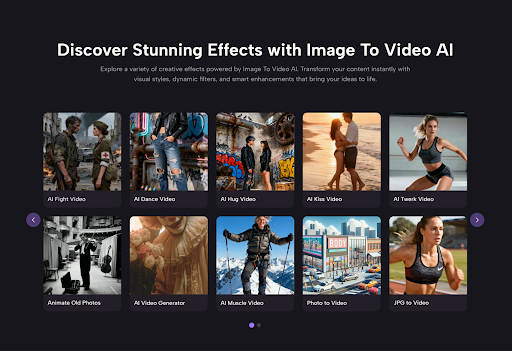
A Measured Takeaway
Image to Video AI works best when it’s treated as an extension of photography, not a replacement for filmmaking. If your goal is to give an image more presence — to let it breathe rather than shout — this approach can be genuinely useful.
With calm direction, realistic expectations, and a willingness to iterate, image-to-video becomes less about spectacle and more about exploration: a way to see how motion reshapes meaning, one frame at a time.
HOW DO YOU FEEL ABOUT FASHION?
COMMENT OR TAKE OUR PAGE READER SURVEY
Featured



You spend two hundred, three hundred, sometimes five hundred dollars on a perfume from a famous luxury brand.