
How Digital Signage Supports Modern Business Communication
PAGE
By PAGE Editor
Digital signage supports modern business communication by turning the physical workplace into a live, constantly updated information space that connects management and employees. At a time when inboxes are overflowing and internal memos are easy to ignore, on-site screens give you a clear, visual way to share messages so important updates reach everyone-whether they sit at a desk, work on a production line, or walk through a lobby.
Using bright visuals and instant updates, businesses can cut through the noise of traditional channels, raise employee engagement by up to 30%, and build a shared culture based on openness and fast information flow.
To do well in today’s fast-moving work environment, companies are moving away from using screens as “digital wallpaper” that no one notices and instead using connected platforms like LOOK Digital Signage. These tools let communication teams control content remotely so the right message appears on the right screen at the right time.
When linked to existing business systems, digital signage shifts from being just a display to becoming a useful part of daily operations that boosts productivity and keeps communication smooth.
What Is Digital Signage in Business Communication?
How Does Digital Signage Differ from Traditional Communication Tools?
Traditional tools like printed posters, static noticeboards, and even company-wide emails often feel slow and easy to ignore. Printed materials cost a lot to create and distribute and are out of date the moment a policy changes or a meeting is moved.
Research shows a US company with 100 employees can spend around $48,000 a year just making, moving, and throwing away paper-based notices. Digital signage removes many of these problems by giving you a modern alternative that can be updated in seconds across multiple locations.
Unlike email, which requires people to open and read messages, digital signage meets employees where they already are. It attracts up to 400% more views than static posters and has a recall rate of up to 83%.
While an email may sit unread for days, a bright screen in a breakroom or near the elevators helps people absorb messages naturally during their normal routine. It turns communication from another “task” into a natural part of the work setting.
Key Components of Digital Signage Systems
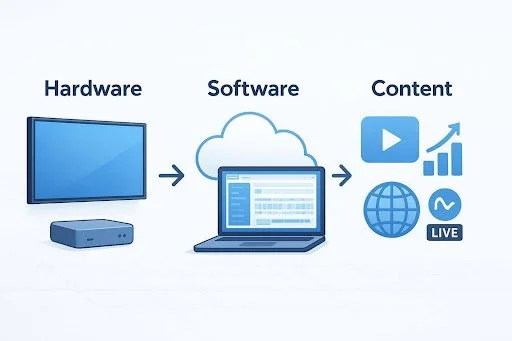
A strong digital signage system has three main parts: hardware, software, and content. The hardware usually includes commercial-grade screens built for round-the-clock use, which last longer than consumer TVs.
These work with media players-small devices that store, process, and send content to the screens. Newer players often include Neural Processing Units (NPUs) so they can handle AI features directly on-site.
The software part is the Content Management System (CMS), which acts as the control center. A cloud-based CMS lets admins schedule content, manage multiple locations, and check device status from anywhere with internet access.
The final piece is the content itself-videos, animations, live data feeds, and images. When these three parts work well together, you get a reliable setup that can show anything from urgent safety messages to up-to-the-minute sales dashboards.
Why Digital Signage Matters for Modern Businesses
Addressing Common Workplace Communication Challenges
In many workplaces, poor communication quietly reduces productivity. Teams miss key updates because they are buried in long chat channels or lost in crowded inboxes. This is especially common for frontline and non-desk workers who may not have regular access to a computer or a company email account. Without a direct channel, they rely on word-of-mouth or old printed notices, which often leads to confusion and weak alignment with company goals.
Digital signage helps close these gaps by giving the organization a central, always-visible information source. It simplifies how messages are shared and keeps even the most mobile workers informed.
By placing screens in busy areas-like shop floors, loading zones, and staff rooms-companies can make sure that everyone, no matter their job, sees the same clear information at roughly the same time. This cuts down on noise and mixed messages and replaces them with clear, focused communication.
The Role of Real-Time Information Sharing
Modern business requires information that moves quickly. Whether it’s a last-minute shift change, new production goals, or a safety issue, waiting for the next town hall isn’t an option.
Digital signage is ideal for fast updates because messages can be pushed to all connected screens within seconds. This real-time flow supports a culture of openness and quick reaction, helping the company feel more responsive and connected.
Real-time updates also allow “infotainment”-a mix of necessary company information with lighter content such as local weather, traffic, or industry headlines through RSS feeds. This keeps the screens fresh and gives employees a reason to look often.
When people trust that what they see is current and helpful, they’re more likely to pay attention to wider company messages shown on the same screens.
Top Benefits of Digital Signage for Business Communication
Raising Employee Engagement and Motivation
Engaged employees help a company grow: they stay longer, share more ideas, and are usually more productive. Digital signage supports this by giving a public space for recognition. Showing work anniversaries, sales wins, or “employee of the month” stories on large screens makes people feel noticed and appreciated. About 60% of employees say they feel more motivated when their efforts are recognized on visible platforms.
Using digital displays to tell the company’s story and share successes builds a sense of shared direction. This visual storytelling makes employees feel part of something larger than their day-to-day tasks. When morale rises, business results often follow, with motivated teams sometimes being up to 25% more productive than disengaged ones.
Improving Internal Communication Clarity
The brain handles visuals much faster than long blocks of text. Digital signage takes advantage of this by using short headlines, strong images, and rotating slides to show information in a clear, easy-to-scan format.
This helps avoid “information overload” and keeps the main point from getting lost. Using templates and consistent branding also makes messages look clear, organized, and confident.
Boosting Operational Efficiency and Productivity
Digital signage supports smoother workflows by automating how information is shared. Instead of managers spending time in repeated meetings to update teams on KPIs or production figures, these numbers can show live on displays where people work. Staff can then make decisions based on real data in real time.
In manufacturing and logistics, screens that show inventory, shipment status, or delivery windows help prevent delays and keep processes moving without extra manual checks.
Strengthening Brand Identity and Culture Display
Company culture is often something people feel but can’t see. Digital signage brings it out into the open. Regularly displaying mission statements, core values, and branded visuals reminds both employees and visitors what the company stands for.
This is especially helpful for organizations with many branches, where it’s hard to keep a consistent atmosphere. Digital signage makes sure an employee in a small office gets the same leadership messages and brand visuals as someone at headquarters.

Cost Effectiveness Compared to Paper and Email
While screens and software require an initial spend, long-term returns are usually strong. Many companies recover their investment within 2-3 years. By reducing ongoing costs for paper, ink, distribution, and manual updates to noticeboards, digital signage often pays for itself.
It also saves staff time: one person can control a global network of screens-work that would otherwise need many hours of manual effort with printed materials.
Key Features and Technological Innovations in Digital Signage
Cloud-Based Content Management and Scalability
Cloud-based CMS platforms have changed how companies manage their screen networks. These systems offer high flexibility, letting admins add displays or push content to many sites with little extra effort.
Because everything is hosted in the cloud, there is less need for on-site IT support, and security patches can be applied automatically. This kind of growth potential is very helpful for businesses that plan to expand and need a communication system that can grow with them.
AI-Driven Personalization and Predictive Messaging
Artificial intelligence is making digital signage more context-aware. By looking at factors like time of day, typical audience, or local weather, AI can choose which content to show for best results.
For example, some retail stores use AI cameras to show ads suited to the viewer’s estimated age and gender. In offices, AI could show different content in the morning rush than in the afternoon slowdown, so messages always feel timely and relevant.
Interactive Capabilities for Employee and Visitor Engagement
There is a growing shift from passive viewing to active interaction. Touchscreens and kiosks let users explore information on their own-whether that’s browsing products, registering for a meeting, or taking a quick survey. QR codes on layouts let employees scan and open more details on their phones, extending the message from the shared screen to personal devices.
Data-Driven Insights and Performance Dashboards
Modern signage tools work well with analytics platforms like Power BI, Google Sheets, or custom APIs. This connection allows real-time visual dashboards instead of static reports. Teams can see live graphs on revenue, customer satisfaction (CSAT), helpdesk queues, and more. These dashboards help staff react sooner and stay aligned with current company performance.
Sustainability and Energy Efficiency
Sustainability is now a standard business goal. New LED screens use less energy than older models, and many systems include smart power options that dim or switch off screens after hours. ePaper displays are also growing in use for room booking and desk management, often running for more than five years on a single battery. Replacing paper notices with digital displays cuts waste and helps lower the company’s environmental impact.
Practical Applications of Digital Signage in the Workplace
Broadcasting Company Announcements and Updates
From leadership updates to major project milestones, digital signage works well for company-wide announcements. It keeps everyone informed and supports a single, consistent message across all locations.
HR Information, Shift Schedules, and Compliance Alerts
HR teams can use digital signage to highlight benefits enrollment dates, payroll notices, and training options. In shift-based workplaces, screens can show schedule changes and holiday plans in real time, reducing the pressure on managers to answer the same questions again and again.
Emergency Notifications and Safety Procedures
During an emergency, speed is everything. Digital signage can work with alert systems (such as CAP notices) to quickly take over all screens with evacuation plans or safety steps. Regular tests strengthen staff awareness and support the organization’s focus on safety and well-being.
Internal Recognition, Events, and Culture Building
Screens are great for everyday “thank you” messages and small celebrations that shape a positive workplace. They can promote office events, welcome new team members, or highlight community projects, helping people feel included and connected.
Performance Metrics and Team Achievements
Sales and operations teams often respond well to visible goals. Showing leaderboards, progress bars, or monthly targets encourages friendly competition and clear accountability. It adds a game-like element to work where achievements are visible to everyone.
Wayfinding and Facility Management
Large offices and campuses can be confusing for visitors and new hires. Digital wayfinding helps people move around more easily, reducing reliance on reception staff and improving the overall visitor experience.
Conference Room Status and Meeting Schedules
Small displays outside meeting rooms can show real-time room status, connect to Outlook or Google Calendar, and allow instant bookings through touch or QR codes.
Interactive Directories and Navigation
Interactive kiosks can show searchable staff lists and department directories, along with floor maps. This helps guests and employees find their way quickly instead of wandering the halls.
How to Implement Digital Signage in Your Business
Clarifying Communication Goals and Audience Needs
Before buying hardware, decide what you want to achieve. Do you want to cut missed messages, lift morale, improve safety, or a mix of these? Think about who you’re talking to-office workers, frontline staff, or both. That will guide where you place screens and what kind of content you show.
Selecting the Right Hardware and Software Solutions
Avoid using cheap consumer TVs for business use; they’re not built for long hours or tougher conditions. Pick software with an easy-to-use CMS, strong security options, and room to grow. Choose platforms that support the apps and data sources you already use, such as social feeds or BI dashboards.
Content Creation and Management Best Practices
Content quality matters, and so does consistency. Templates help keep your branding uniform, and a content calendar helps prevent empty or outdated playlists. Use a mix of static slides, videos, and live data to hold attention. Keep messages short, clear, and relevant to people’s daily work.
Screen Placement Strategies for Maximum Impact
Placement plays a big role in success. Install screens in busy waiting or pause areas where people naturally stop-breakrooms, entrances, reception spaces, and elevator lobbies. Mount screens at eye level and use font sizes that are easy to read from typical viewing distances.
Integration with Existing Business Systems
To reduce manual work, connect your signage system with tools you already use. Links to calendar systems, Slack/Teams channels, or KPI dashboards let content refresh automatically, so your communication team doesn’t have to update everything by hand.
Scaling and Supporting Multi-Site Deployments
For larger organizations, centralized management is key. Use a platform that supports role-based permissions: a central team can protect brand standards, while local managers add their own content such as cafeteria menus, local news, or site-specific notices.
Common Challenges and Solutions in Adopting Digital Signage
Overcoming Initial Investment Concerns
The upfront cost may cause hesitation, so focus on the long-term return. Point to yearly savings on paper, printing, and time, plus productivity gains of around 25%. You can also start with a pilot-just a few screens-and expand once results are clear.
Centralized Control and Content Security
Security is a key point for IT teams. Choose a provider that uses encrypted connections and strong user permissions so only approved staff can change what appears on screens.
Streamlining Maintenance and Technical Support
Work with a trusted vendor that offers solid support. Train an internal team on basic checks and fixes to limit downtime, while relying on the vendor for complex issues and regular updates.
Keeping Messaging Consistent and Current
Automate wherever possible. Use content that expires on a set date and connect screens to live data sources so information stays current. Outdated messages quickly reduce trust in the system.
Maximizing the Value of Digital Signage for Business Communication
Measuring Success and Gathering Feedback
Use analytics to see how your screens are performing. Many CMS tools show how often content plays and how users interact with touchscreens. Combine this with short, anonymous surveys to learn whether employees feel more informed and engaged.
Adjusting Strategies as Your Business Grows
Your communication needs will shift as the company changes. Review your content plan and screen layout regularly to check that they still support your main goals. Digital signage is flexible-update your approach as new priorities, teams, and locations appear.
Frequently Asked Questions about Digital Signage for Business Communication
Is digital signage better than email for internal communication?
Digital signage and email cover different needs, but for messages that must stand out, digital signage usually works better. It has a recall rate of about 83% and reaches staff who rarely check email, such as frontline workers.
Does digital signage support remote or hybrid workforces?
Yes. Many platforms can send the same content to mobile apps, desktop screensavers, or the company intranet, so remote staff see the same updates as people in the office.
How often should content be updated on digital displays?
Update content as often as needed to keep it useful. Daily or weekly refreshes work well for KPIs and news items, while urgent alerts should go out right away. Old or repetitive content quickly makes people stop paying attention.
What is the typical cost and ROI for digital signage?
Costs depend on how many locations and screens you use, but many companies see a return within 2-3 years. Savings come from lower print and labor costs and from clear gains in engagement and productivity.
Can digital signage improve employee engagement and retention?
Yes. When used to recognize achievements, highlight milestones, and support open communication, digital signage helps employees feel valued and included. This stronger sense of connection often leads to higher loyalty and lower turnover.
Looking ahead, digital signage is moving from a “nice-to-have” to a key part of how workplaces communicate. Deeper links with Augmented Reality (AR) for training and AI for highly personal messages are likely to grow.
By adopting these tools now, businesses can stay ahead, building a workplace where people are better informed, more connected, and more productive as new challenges appear.
HOW DO YOU FEEL ABOUT FASHION?
COMMENT OR TAKE OUR PAGE READER SURVEY
Featured





Meta’s prescription-ready Ray-Ban AI glasses mark a pivotal shift from experimental wearable tech to everyday infrastructure, embedding intelligence seamlessly into how—and what—we see.