
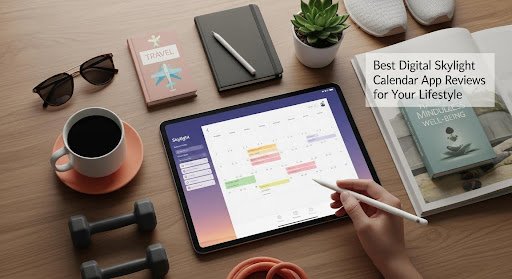
Best Digital Skylight Calendar App Reviews for Your Lifestyle
PAGE
By PAGE Editor
Digital Calendar App Reviews: Which One Fits Your Lifestyle?
In today’s busy world, keeping track of schedules, meetings, and personal events can feel overwhelming. Thankfully, digital calendars have transformed the way we organize our time. Whether you are managing a business, planning family activities, or simply trying to stay productive, the right digital calendar app can make your life much easier.
But with so many choices like Google Calendar, Outlook, Apple Calendar, and the Skylight Calendar, how do you know which one fits your lifestyle? This guide reviews the top digital calendar apps and helps you find the perfect one for your daily routine.
1. Why a Digital Calendar Matters
A digital calendar is more than just a tool to track dates. It helps you visualize your time, stay on schedule, and connect with others. Modern calendar apps allow you to:
Sync events across all your devices
Set reminders for tasks and appointments
Share schedules with family, friends, or coworkers
Integrate with your favorite productivity tools
No matter your lifestyle, a good digital calendar can reduce stress, improve focus, and help you make the most of your time.
2. Google Calendar – Simple, Reliable, and Free
Google Calendar remains one of the most widely used digital calendars. It is simple, free, and fully integrated with the Google ecosystem.
Key Features:
Works across all devices and platforms
Allows color-coded calendars for different areas of life
Syncs automatically with Gmail, Google Meet, and Tasks
Supports shared calendars for teamwork
Best For: Students, professionals, and small businesses that rely on Google Workspace.
If you use a Skylight Calendar, you can connect it directly to your Google Calendar to display all your events in real time. Many families also show their schedules on a Skylight Frame so that everyone can easily see what is coming up each day.
3. Microsoft Outlook Calendar – Ideal for Work and Teams
For professionals who use Microsoft Office, Outlook Calendar is a smart choice. It is built into Outlook email and integrates deeply with Microsoft Teams and other Office tools.
Key Features:
Unified view for emails, events, and meetings
Easy sharing for team members
Scheduling assistant for finding meeting times
Works seamlessly across devices
Best For: Business users, corporate teams, and remote workers.
Outlook also syncs with the Skylight Calendar, helping you keep an eye on your work meetings alongside personal plans. It is especially helpful for professionals who need a balance between office commitments and home life.
4. Apple Calendar – Perfect for Apple Users
If you are deeply invested in the Apple ecosystem, Apple Calendar (also known as iCal) is a clean and reliable choice. It comes pre-installed on all Apple devices and syncs automatically through iCloud.
Key Features:
Simple and elegant design
Works with Siri voice commands
Automatically adjusts for time zones and travel
Integrates with Apple Reminders and Maps
Best For: iPhone, iPad, and Mac users who prefer an intuitive and minimalist layout.
You can also link your Apple Calendar to a Skylight Frame to see your events at a glance. This setup works well for families that use a mix of Apple and Android devices.
5. Skylight Calendar – The Smart Home Scheduling Solution
The Skylight Calendar stands out among digital calendars because it combines technology with real-life visibility. Unlike standard apps, it is a physical touchscreen device that displays your schedules, reminders, and to-do lists in one central place.
Key Features:
Syncs with Google, Outlook, and Apple Calendars
Large and bright touchscreen display
Color-coded family member events
Interactive features for tasks, meals, and chores
Best For: Families, couples, and busy households.
The Skylight Frame, which displays digital photos, pairs perfectly with the Skylight Calendar. Together, they create a smart home command center that keeps your family organized while adding a personal touch with cherished memories.
6. Fantastical – For Advanced Apple Users
Fantastical is a premium digital calendar designed for Apple devices. It offers more powerful features than the built-in Apple Calendar while maintaining a sleek design.
Key Features:
Natural language event creation
Weather forecasts and time zone support
Task management built in
Widgets and quick actions on iPhone and Mac
Best For: Professionals and Apple enthusiasts who want advanced scheduling tools without sacrificing design.
Fantastical can also sync with other platforms, making it easy to combine work and personal schedules in one view.
7. Any.do – Task Management Meets Calendar
If you like combining to-do lists with calendar planning, Any.do might be your best option. It merges tasks, events, and reminders into a single view for improved productivity.
Key Features:
Task and event synchronization
Smart reminders and recurring tasks
Integrates with voice assistants like Alexa and Google Assistant
Cross-platform compatibility
Best For: Busy professionals and productivity lovers who prefer to manage everything in one place.
Pairing Any.do with a Skylight Calendar allows you to visualize your to-do lists on a dedicated screen, turning your routine into a visually organized plan.
8. TimeTree – Shared Planning Made Easy
TimeTree is designed for families and small groups who want to plan together. It allows multiple users to share and update a single calendar, making coordination effortless.
Key Features:
Group sharing for events and reminders
Comment section for each event
Notification system for updates
Available for free on mobile and desktop
Best For: Families, couples, and groups planning events together.
When connected to a Skylight Calendar, TimeTree can help every member of the family stay on track by keeping shared events visible in a common space.
9. Which Digital Calendar Fits Your Lifestyle?
Choosing the right calendar depends on how you live and work. Here is a quick overview:

If your goal is to improve family coordination or visualize your daily plans, the Skylight Calendar offers a unique and modern approach. It turns your schedule into something tangible and visible, reducing the chaos of daily life. Adding a Skylight Frame enhances that experience by displaying family photos next to your schedule, creating a warm and functional environment.
10. Final Thoughts
Your calendar should match your habits, tools, and lifestyle. Digital calendars have evolved far beyond simple reminders. They are now personal assistants that keep you organized and help you make time for what truly matters.
If you value convenience and visibility, the Skylight Calendar is one of the most practical innovations available today. Combined with the Skylight Frame, it brings both organization and inspiration to your space. Whether you are a professional managing deadlines or a parent coordinating family routines, there is a perfect digital calendar to keep your life running smoothly.
HOW DO YOU FEEL ABOUT FASHION?
COMMENT OR TAKE OUR PAGE READER SURVEY
Featured



Recent years have seen several unprecedented advancements in oral care.