
VisualGPT AI Logo Generator — Create Stunning Logos Instantly
PAGE
By PAGE Editor
When I first tested VisualGPT AI Logo Generator, I expected a simple logo maker. Instead, I found one of the most flexible, intuitive, and genuinely useful branding tools I’ve tried this year. As someone who regularly helps founders, designers, and marketers refine their brand identities, I’m constantly searching for tools that balance creativity, speed, and quality. VisualGPT delivered on all three.
Below is my full review and recommendation, written from the standpoint of someone who uses logo tools professionally and cares deeply about practical, real-world results.

Why VisualGPT’s AI Logo Generator Stands Out
1. No Sign-Up Required — Start Designing Immediately
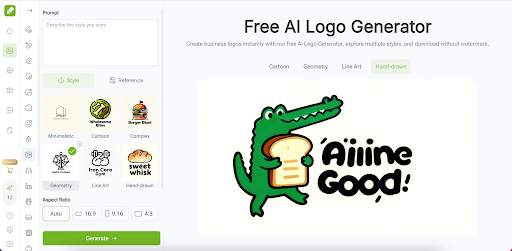
One of the biggest friction points in most logo tools is the tedious sign-up wall. VisualGPT’s AI Logo Generator requires zero registration, meaning you can jump straight into creating your logo in seconds. This alone makes VisualGPT far more accessible for entrepreneurs, students, hobby creators, and anyone rushing to launch a brand quickly.
2. VisualGPT Offers a Wide Range of Templates for Any Style
Whether you’re building a tech startup, a personal brand, a fashion label, or a local café, VisualGPT includes a rich set of pre-designed templates. These templates help users who might not have design experience but still want something clean and professional.
From minimalist monograms to bold geometric marks, or even playful mascot-style logos, VisualGPT’s variety makes it easy to experiment with directions before committing. This flexibility is valuable for small teams or indie founders who often need multiple iterations before picking a final style.
3. High-Resolution Output: 1K, 2K, 4K
Quality matters. A logo isn’t just for your website — it ends up on packaging, banners, pitch decks, merchandise, and ads. VisualGPT supports outputs in multiple sizes including 1K, 2K, and 4K, ensuring the final logo looks crisp everywhere.
This high-resolution support is one of the strongest advantages VisualGPT has over lightweight online logo makers that offer only low-res results.
My Experience Using VisualGPT’s AI Logo Generator
Smooth Creative Workflow
The interface is simple: enter your brand name, choose the style, and VisualGPT handles the rest. Within seconds, I received multiple logo variations that looked polished enough to use immediately.
What impressed me most was how VisualGPT understands different brand moods. For a modern tech brand, it generated sleek abstract marks. For a boutique lifestyle brand, it produced warm, handcrafted visual styles. This adaptability makes VisualGPT feel more like a design assistant than a template app.
Reliable Visual Consistency
A common issue in AI generative tools is style inconsistency. VisualGPT avoids this problem. Each set of logo options looks cohesive, thoughtfully composed, and aligned with the chosen direction. This reduces the time spent tweaking or regenerating.
Easy Export, Easy Testing
Since VisualGPT offers multiple sizes and sharp resolutions, I could test the logos in real-world mockups: business cards, app icons, web headers, and product packaging. The logos stayed clean and sharp in every environment.
Who Should Use VisualGPT AI Logo Generator?
Entrepreneurs & Startups
If you’re launching a new brand and need a high-quality logo in minutes, VisualGPT is perfect. No need to wait for designers or spend days revising concepts.
Designers Who Need Fast First Drafts
Even as a professional, I found VisualGPT incredibly helpful for generating initial ideas. It accelerates brainstorming and reduces creative blocks.
Small Businesses & E-commerce Sellers
Shop owners on Etsy, Shopify, Amazon, and social platforms need clean, high-resolution logos. VisualGPT’s 4K export makes this effortless.
Students, Content Creators, Streamers
If you're building a YouTube channel, gaming profile, online portfolio, or personal project, VisualGPT makes branding straightforward and fun.
Top Reasons I Recommend VisualGPT’s AI Logo Generator
Reason 1: Speed + Quality
In under a minute, you get multiple professional logo choices — something that used to take hours.
Reason 2: No Sign-Up Barrier
You can try VisualGPT immediately, without committing or giving away personal information.
Reason 3: Professional-Grade Resolution
Being able to download 1K, 2K, and 4K versions gives you the flexibility to use the logo anywhere.
Reason 4: Diverse Styles and Templates
The preset templates allow you to explore different brand identities effortlessly.
Reason 5: Reliable Output That Feels Designed, Not Random
VisualGPT’s design intelligence makes the results feel purposeful and usable.
Final Thoughts: Should You Try VisualGPT AI Logo Generator?
Absolutely. VisualGPT’s AI Logo Generator is one of the rare tools that genuinely saves time, improves creative quality, and feels enjoyable to use. Whether you’re launching a startup, refreshing your brand identity, or simply exploring concepts, VisualGPT gives you everything you need to create stunning logos with ease.
If you want fast, high-resolution, professional logo designs without a learning curve, I strongly recommend giving VisualGPT a try: https://visualgpt.io/ai-logo-generator.
You can start creating instantly — no registration needed.
HOW DO YOU FEEL ABOUT FASHION?
COMMENT OR TAKE OUR PAGE READER SURVEY
Featured





The Antwerp Six book reframes the legendary collective not just as designers, but as products of a culturally charged Antwerp whose tensions and countercultural energy reshaped global fashion for generations.