
A Complete Guide to Using the Sora 2 AI Video Generator Free Online
PAGE
By PAGE Editor
Creating professional, high-quality videos has never been easier or more accessible. With the launch of Sora 2 free online, anyone can now produce stunning visual content without expensive software or specialized skills. Whether you're a content creator, marketer, educator, or someone looking to bring creative ideas to life, Sora 2 AI video generator is revolutionizing video production workflows everywhere.
This comprehensive guide will show you how to leverage this powerful tool to create captivating videos at no cost. Let's explore how Sora v2 free online can save you time, effort, and money while delivering professional results that engage your audience.
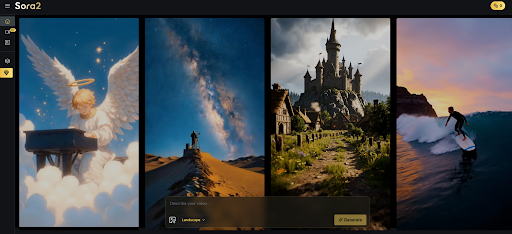
What is Sora 2?
Sora 2 represents the next evolution in AI-powered video creation technology. As a cutting-edge AI video generator, it enables users to create high-quality videos using simple text prompts or uploaded images. Unlike complex video editing software that requires technical expertise and powerful hardware, Sora 2 free online is entirely browser-based, making it accessible from any device with an internet connection.
The platform stands out for its user-friendly approach to video creation while maintaining professional-grade output quality. Whether you're creating content for social media, marketing campaigns, educational materials, or personal projects, Sora 2 AI video generator provides the tools you need to produce engaging videos in minutes rather than hours.
Getting Started with Sora 2: A Step-by-Step Guide
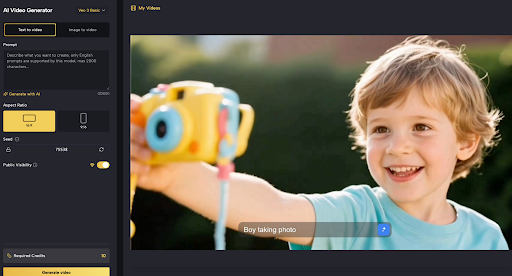
1.Select Your Creation Mode
Text to Video: Choose this if you want to create an entirely new video scene from a text description.
Image to Video: Choose this if you already have a static image that you want to animate.
2. Provide Your Creative Asset
If using "Text to Video":
Skip this step and proceed to the prompt.
If using "Image to Video":
Drag and drop your image (JPG/PNG, max 10MB) into the upload area.
Alternatively, click to select a file or choose from your "Library".
3. Describe Your Vision (The Prompt)
In the "Prompt" text box (up to 5000 characters), describe exactly what you want to create:
For "Text to Video": Describe the full scene, subject, action, mood, and camera movement.
Example: "A golden retriever happily running through a field of flowers, camera follows from the side, bright sunlight."
For "Image to Video": Describe what parts of the image should move and how the camera should behave.
Example: "The clouds in the sky move slowly to the right, the lake ripples, and the camera slowly zooms in."
4. Set Your Video Parameters
Aspect Ratio: Choose between "Landscape" or "Portrait".
Public Visibility: Toggle this "on" (as shown by the diamond icon) if you want your creation to be publicly visible.
5. Generate Your Video
Check the "Credits Required" at the bottom (e.g., 10 credits).
Click the "Generate Video" button to begin.
Sora 2 allows you to create and download up to two videos per month for free, making it an ideal starting point for creators on a budget.
Features of the Sora 2 AI Video Generator
This platform is an all-in-one creative suite designed to take your ideas from text to a fully finished video.
1. Text/Image-to-Video Generation
Whether you start with a photograph or a simple text description, Sora 2 transforms your input into cinema-quality videos within minutes. The platform eliminates the need for complex editing software or professional training—simply provide your creative vision, and the AI brings it to life with stunning visual results that rival professional studio productions.
2. AI-Powered Audio Synchronization
Great videos need more than just compelling visuals—they require the perfect soundtrack. Sora 2 intelligently analyzes your video content and automatically generates matching audio elements, from ambient sound effects to background music. This seamless audio-visual harmony creates a complete viewing experience that's ready for social media, advertising, and professional marketing materials.
3. Multi-Platform Format Adaptation
Stop worrying about aspect ratios and technical specifications. Sora 2 offers flexible output options with both horizontal (16:9) and vertical (9:16) formats, delivering crystal-clear 1080p HD quality. Whether you're posting to YouTube, creating TikTok content, or designing Instagram Stories, your videos will display perfectly on every platform without awkward cropping or quality loss.
4. Realistic Physics Simulation
Powered by OpenAI's breakthrough technology, Sora 2 doesn't just animate—it simulates reality. Water ripples naturally, fabrics move with authentic weight, and lighting responds realistically to motion. This advanced physics engine ensures every frame exhibits the natural movement and behavior audiences expect from premium, professionally-produced content.
5. Free Online Access
Professional video creation shouldn't require a professional budget. Sora 2 free online provides genuine no-cost access with two video generations monthly-no hidden fees, no invitation codes, no credit card required. The cloud-based platform runs entirely in your browser, meaning any device with internet access becomes your personal video production studio.
Pro Tips for Maximizing Your Sora 2 Experience
Craft Detailed, Descriptive Prompts: The Sora 2 AI video generator responds best to specific, vivid descriptions. Include details about camera angles, lighting, mood, and action for optimal results.
Experiment with Style Combinations: Don't hesitate to test different visual styles to discover unique aesthetics that make your content stand out. The Sora 2 free online platform encourages experimentation without additional cost.
Plan for Multi-Platform Distribution: Use Sora 2's format options to create different versions of the same video optimized for various platforms, maximizing your content's reach.
Layer Features for Enhanced Results: Combine the AI image generator with the video creation tools to storyboard complex sequences before generating the final video.
Utilize the Free Tier Strategically: The Sora 2 free online version offers generous access. Plan your monthly video projects to make the most of your available generations.
Who Can Benefit from Sora 2 Free Online?
The accessibility and power of Sora 2 AI video generator make it valuable for:
Content Creators and Social Media Managers who need to produce regular, engaging video content quickly
Digital Marketers create promotional materials, advertisements, and brand stories
Educators and Trainers developing instructional materials and visual explanations
Small Business Owners with limited budgets for professional video production
Hobbyists and Creative Individuals exploring video as a medium for personal expression
Conclusion
Sora 2 is more than just a tool—it’s your creative partner. By combining simplicity, affordability, and advanced AI technology, it empowers you to create stunning videos effortlessly.
Whether you’re a beginner or a seasoned pro, Sora 2 removes the barriers to video creation, helping you focus on what truly matters: bringing your ideas to life.
Ready to get started? Try Sora 2 for free at Sora V2
HOW DO YOU FEEL ABOUT FASHION?
COMMENT OR TAKE OUR PAGE READER SURVEY
Featured



KANE Footwear expands its sustainable recovery portfolio with the Revive OB, an open-backed performance shoe engineered from Brazilian sugarcane-based foam to deliver hands-free convenience, biomechanical support and lower-impact manufacturing.